After Effects plugins I made for my own edits

I'm yuhframer. I cut AMVs, and when After Effects is missing something I want, I build it and put it here. Everything is free.

Install and help guide

How to install each plugin, open it in After Effects, and fix it when it doesn't show up. Pick yours.

Check your After Effects first

Find your version under Help > About After Effects. Half of all install problems come down to version.

PluginStatusWorks onAfter Effects
FrameStationOut nowWindowsTested on 2026
Pulse exOut nowWindows, macOS2021 or newer
AE Theme exBetaWindows x642026, build 26.0.0.67
AutoMask exIn developmentWindows, macOS2022 or newer
GIF Panel exIn developmentWindows, macOS, needs Flow2021 or newer

FrameStation

A Windows setup file. It installs for your Windows user only, so you don't need admin rights.

  1. Download it

    Get framestation-0.1.0-setup.exe (63 MB).

  2. Run the setup

    Double-click the .exe and follow the installer.

    Windows may show a SmartScreen warning because the build isn't code-signed yet. Click More info, then Run anyway. To make sure the file is the real one, compare it against the published checksums.

  3. Restart After Effects

    Quit After Effects completely and open it again. It only picks up new plugins when it starts.

  4. Open it

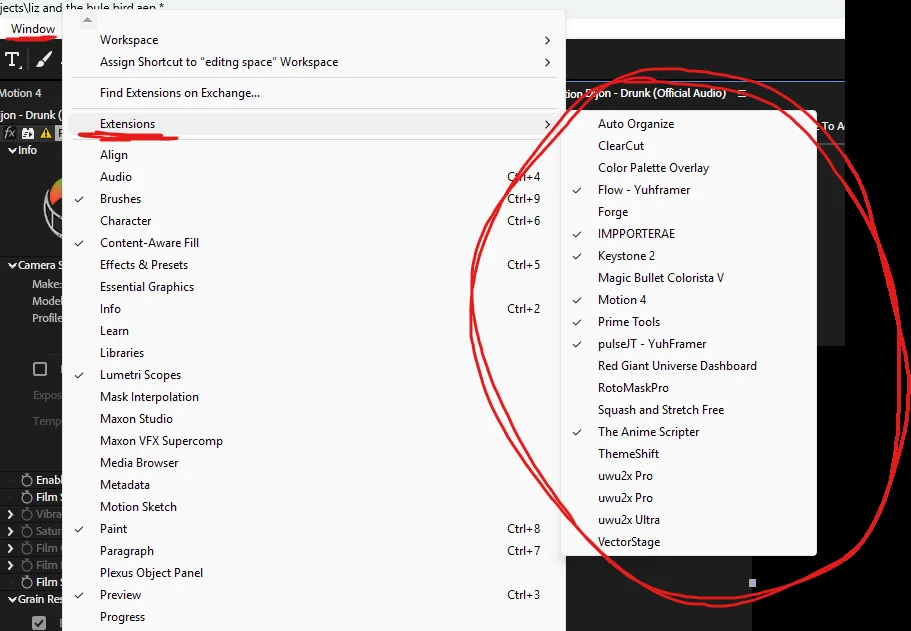
    Go to Window > Extensions > FrameStation and drag the panel wherever you want it in your layout.

  • Removing it. FrameStation shows up in Windows Installed Apps with a normal uninstaller.

Pulse ex

A zip, for Windows and macOS, After Effects 2021 or newer. It's an extension, so it goes in your extensions folder, not the Scripts folder.

  1. Download it

    Get pulse-ex-3.5.1.zip (66 MB).

  2. Make a folder for it

    Create a folder called pulseJT here. If the folders on the way don't exist yet, create them too.

    Windows%APPDATA%\Adobe\CEP\extensions\pulseJT
    macOS~/Library/Application Support/Adobe/CEP/extensions/pulseJT

    On Windows, paste the path into the File Explorer address bar and press Enter. On a Mac, use Go > Go to Folder in Finder.

  3. Unzip into it

    Extract everything from the zip into the pulseJT folder. On Windows, right-click the zip, choose Extract All, and pick that folder. On a Mac, double-click the zip and move what comes out into it.

  4. Let After Effects load it

    After Effects only loads extensions it trusts. Turn on debug mode once so it loads Pulse. Close After Effects first, then run this:

    Windowsreg add HKCU\Software\Adobe\CSXS.11 /v PlayerDebugMode /t REG_SZ /d 1 /f & reg add HKCU\Software\Adobe\CSXS.12 /v PlayerDebugMode /t REG_SZ /d 1 /f
    macOSdefaults write com.adobe.CSXS.11 PlayerDebugMode 1; defaults write com.adobe.CSXS.12 PlayerDebugMode 1

    On Windows, paste it into Command Prompt. On a Mac, paste it into Terminal. On After Effects 2021, also run it with CSXS.10. You only ever do this once.

  5. Open it

    Start After Effects and go to Window > Extensions > pulseJT - YuhFramer. Dock it wherever feels right. Updating from an older version? Close the old panel tab.

    The After Effects Window menu opened to Extensions. pulseJT - YuhFramer is in the list, circled in red marker.
    The Extensions list in my own After Effects. Yours shows whatever you have installed.
  • Slow preview. Very large playlists can make AE's preview less responsive. Keep the queue shorter if preview drags.

AE Theme ex (beta)

A Windows setup file. It only works on After Effects 2026, build 26.0.0.67, so check that before you install.

  1. Check your build

    Open Help > About After Effects. If it doesn't say 26.0.0.67, the beta won't run on it yet.

  2. Download it

    Get aetheme-ex-3.20.5-setup.exe (54 MB), for Windows x64.

  3. Run the setup

    Double-click the .exe and follow the installer.

    SmartScreen may warn you because the build isn't code-signed. Click More info, then Run anyway. You can check the file against the published checksums.

  4. Restart After Effects

    Quit After Effects completely and open it again so it loads the theme.

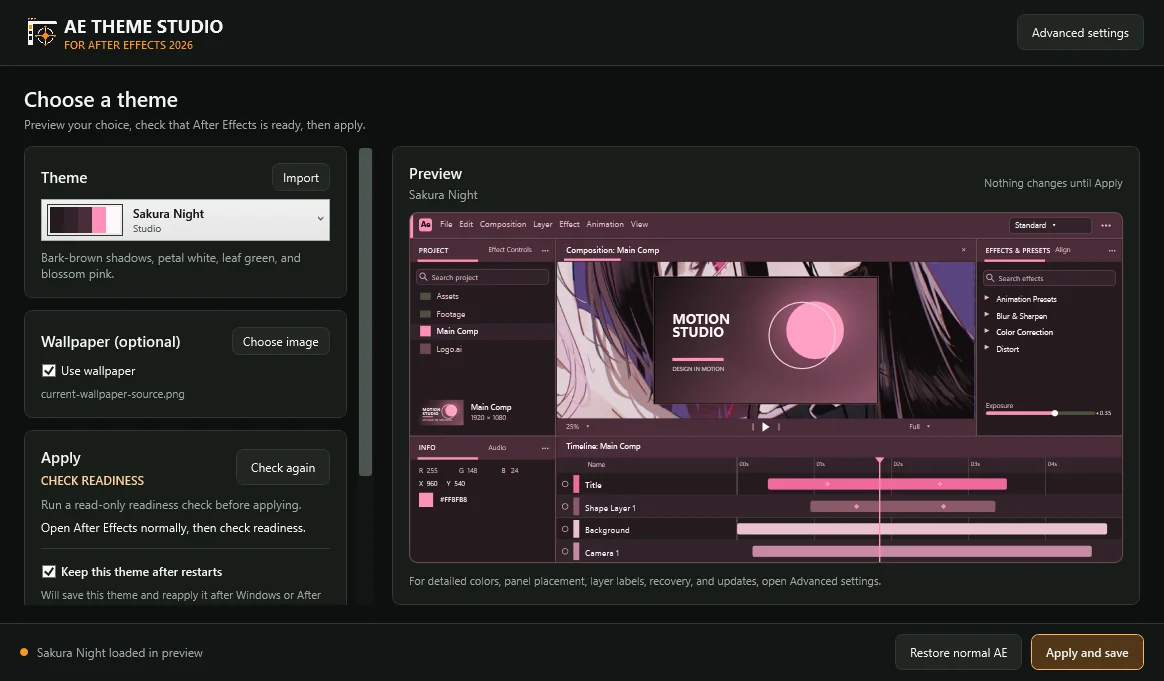
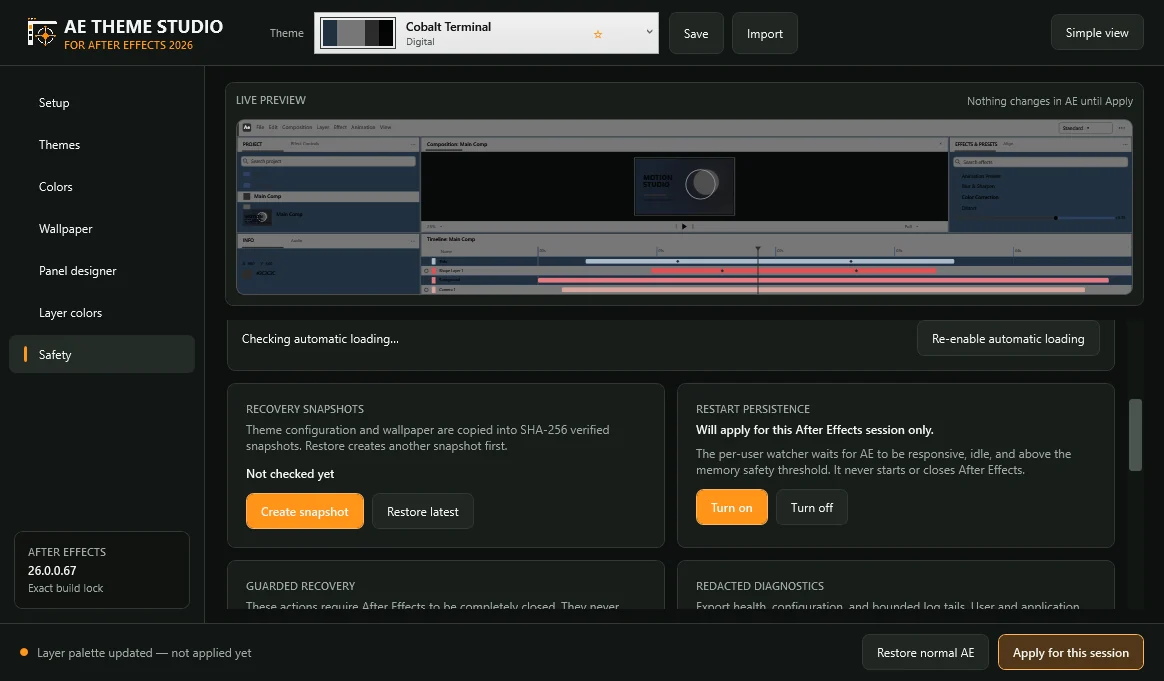
  • Want the normal look back? One click resets After Effects to its default look. Your theme otherwise stays through AE and Windows restarts.
  • Something broke? It's a beta. Use the Report tab and pick AE Theme ex.

AutoMask ex

Not out yet, so there's nothing to install. It's planned for Windows and macOS, After Effects 2022 or newer.

  • Get told when it's out. New plugins land in the Discord first.
  • Expect slow first passes on long clips. High-resolution footage takes longer, and hair, motion blur, and fast movement may still need a manual touch-up.

GIF Panel ex

Not out yet. When it is, it lives inside the Flow panel, After Effects 2021 or newer.

  • Install Flow first. GIF Panel has nowhere to live without it.
  • Restart after installing. Quit and reopen After Effects so both load.
  • Get told when it's out in the Discord.

When it won't show up

It's not in Window > Extensions

Usually After Effects was still open while you installed, or the files ended up in the wrong place.

Fix: Fully quit After Effects and open it again. For Pulse ex, check that the files sit directly inside the pulseJT folder, not inside another folder within it, and that you did the debug mode step.

The panel opens but it's blank

The extension loaded, but After Effects stopped it from running.

Fix: Run the debug mode command again for your AE version, then restart After Effects. On AE 2021 that's CSXS.10, on 2022 to 2024 it's CSXS.11, and on 2025 or newer it's CSXS.12.

Windows says it protected my PC

That's SmartScreen. It warns about any installer that isn't code-signed yet, which these aren't.

Fix: Click More info, then Run anyway. If you want to be sure the file wasn't changed, compare it with the published checksums.

My Mac says it can't verify the developer

macOS is careful with files from outside the App Store. Nothing is wrong with the plugin.

Fix: Allow it under System Settings > Privacy & Security. You only need to approve it once.

Wrong After Effects version

Pulse ex needs After Effects 2021 or newer. AE Theme ex only runs on After Effects 2026, build 26.0.0.67.

Fix: Check Help > About After Effects. If you have more than one version installed, open the newer one.

Still stuck? Post your OS, your After Effects version, and a screenshot in the Discord, or send it from the Report tab.

Update log

What each release added, changed, fixed, or removed, newest first.

FrameStation

FrameStation 0.1.0

The first public build, for Windows. framestation-0.1.0-setup.exe installs per user, without admin rights.

Added

  • Rooms. Create or join a room, see who's there, and chat.
  • Project transfer. Project files are size-checked and SHA-256 verified before they open.
  • Edit sync. Project revisions arrive in order for everyone in the room.

Heads up

  • The installer isn't code-signed, so SmartScreen may warn you. Its checksum is published next to the download.
AE Theme ex

AE Theme 3.20.5

The beta download is now aetheme-ex-3.20.5-setup.exe, for Windows x64 and After Effects 2026 build 26.0.0.67.

Removed

  • The second-script compatibility prompt no longer appears.

Fixed

  • Viewer-detection timeouts no longer stop a theme from applying.

Changed

  • Layer label colors can finish updating separately from the wallpaper.
  • The wallpaper still plays through the native Composition overlay from 3.20.4.

AE Theme ex

AE Theme 3.20.4

The wallpaper moved to a native overlay.

Added

  • A click-through Composition overlay keeps the wallpaper up during full RAM preview.
  • The wallpaper follows the active Composition viewer.

Changed

  • The wallpaper stays inside the viewer instead of covering other panels or the app frame.

Removed

  • The earlier acceleration workaround. Playback doesn't need it anymore.

AE Theme ex

AE Theme 3.20.0

Theme presets, label palettes, and Timeline labels were rebuilt for stronger contrast.

Added

  • Each theme gets its own 16-color label palette.
  • Timeline labels update live, matched to each layer type.

Changed

  • All 33 theme presets were reworked.

Website

Site 1.2

Reports go straight to the Discord, where each one gets its own thread.

Added

  • One report form for bug reports, feature requests, install help, and compatibility notes.
  • If sending fails, you can copy the report and paste it into Discord.
  • Spam protection: required fields, a hidden spam trap, length limits, and blocked mentions.

Website

Site 1.1

More detail for every plugin.

Added

  • Details for Pulse ex, AE Theme ex, AutoMask ex, and GIF Panel ex: what each does, what it works on, and its known issues.
  • A roadmap.
  • A report form that builds a clean Discord message with your plugin, OS, AE version, and details.

Changed

  • Pulse ex is downloadable, AE Theme ex is in beta, and AutoMask ex and GIF Panel ex are marked as in development.

Pulse ex

Pulse ex 3.5.1

Download pulse-ex-3.5.1.zip.

Added

  • Playlist queue. Add videos, GIFs, and images, then shuffle, repeat, reorder, set image duration, remove the current item, or clear what you've watched.
  • Settings tools. Search, health notices, quick resets, preset profiles, and a clear-cache button.
  • Mini mode. Tiny panels get a bigger preview with small controls that show on hover.

Changed

  • Playback. Items load ahead quietly, large videos take a safer path, and stale loads are ignored.
  • Themes. They now reach settings rows, tabs, buttons, playlist rows, toggles, sliders, and dialogs.
  • Restore. Settings, playlist, backdrop, and recent media come back more reliably.
  • New name. Open it from Window > Extensions > pulseJT - YuhFramer. Close the old panel tab after updating.

Website

Site 1.0

pulsejt.app is live, the first public home for Pulse plugins.

Added

  • Home, plugins, install guide, support, and release notes.
  • Pulse ex as a zip download. AutoMask ex and GIF Panel ex listed as in development.
  • Help through the Discord, with a template for what to include.
  • Forced HTTPS and strict browser security headers.

Roadmap

What's coming: new plugins being built, improvements to what's here, and ideas for later. Most of it started as a request in the Discord.

New plugins being built 2

  • AutoMask ex

    Cut a subject out of a shot without rotoscoping every frame. Cleaner edges and faster background swaps. Windows and macOS, AE 2022 or newer.

  • GIF Panel ex

    Looping videos, GIFs, or photos inside the Flow panel, on repeat or as a queue. Needs Flow, AE 2021 or newer.

Improvements next 3

  • Real demo clips

    Short screen recordings of each plugin in use.

  • More install help

    Screenshots for the panel-not-showing and macOS permission cases.

  • Known issues, kept current

    Common problems listed before people have to ask.

Ideas for later 3

  • Update checks

    An easier way to see the latest version of each plugin.

  • Plugin docs

    Deeper docs once the feature lists grow.

  • Your requests

    Ideas from reports and the Discord. Send yours from the Report tab as a feature request.

Report a bug or request a feature

This form posts straight to the Discord, where your report gets its own thread. A copy of the message builds as you type, in case you'd rather paste it yourself.

Check these first

Common install problems

  • Panel not showing. Fully quit and reopen After Effects after installing.
  • Blank panel. For Pulse ex, redo the debug mode step in the install guide.
  • Wrong folder. Include a screenshot of where you put the files.

What helps the most

  • The exact plugin and its version.
  • Your setup. OS, After Effects version, and related plugins like Flow.
  • Proof. A screenshot, a screen recording, or the exact error text.

Get help in the Discord

There's no ticket queue and no support email. Everything happens in one small Discord: questions, bug reports, feature ideas, and new plugins, which land there first.

Where to post

Posting in the right channel gets you an answer faster.

#faq

Read this first

Quick answers to the things that trip most people up. Your question might already be solved.

#support-ticket

Can't get it running

Panel won't show, blank window, a warning you don't understand. Open a ticket for a private thread.

#report-bugs

It's misbehaving

It loads, but freezes, gives the wrong result, or a button does nothing. Say what you did and what happened.

#suggestions

Got an idea

Wish a plugin did one more thing? A lot of what Pulse does started as a suggestion here.

#updates

New releases

Every new plugin and update is posted here before it's on the site. The release notes keep the full history.

#media

Show your edit

Made something with a Pulse plugin? Post it in #media and talk shop in #main.

Get answered faster

  1. Your setup

    Your OS and After Effects version. Find it under Help > About After Effects. Half of all install problems come down to version.

  2. Which plugin

    The exact plugin and what you were doing when it broke. "Pulse won't open" beats "it doesn't work".

  3. A screenshot

    A shot of the error or the empty panel says more than a paragraph. Drag it straight into the channel.

Copy this into your post

Plugin: Pulse ex / FrameStation / AE Theme ex
      OS: Windows 11 or macOS 14
      After Effects: 2024 (24.x)
      What I did: what I clicked and what I expected
      What happened: what I got instead
      Screenshot: drag it in here

Who answers

Just me, yuhframer. I'm an AMV editor building the plugins I wanted to exist, then giving them away. There's no team or support desk behind this.

So when you post, you're talking to the person who made the thing. Replies can take a while because there's one of me, but I read everything. Bring the details above and I'll get you sorted.

© 2026 pulse. Made by yuhframer, free forever. Not affiliated with Adobe.